Airflow & dbt: leveraging Astronomer Cosmos at GetYourGuide
Discover how GetYourGuide integrates Apache Airflow with dbt using Astronomer Cosmos to automate and optimize data workflows. Learn technical solutions for managing dbt interconnectivity across Airflow DAGs, maintaining Delta Lake tables, and streamlining cross-domain dependencies in a modern data platform.


Key takeaways:
In this blog, Giovanni Corsetti and Fabian Bücheler, data platform engineers at GetYourGuide, explore how to integrate Airflow with dbt from the technical side. Learn how to maintain dbt node interconnectivity across Airflow DAGs with Astronomer Cosmos.
{{divider}}
Introduction
At GetYourGuide, we incorporated dbt into our setup and orchestrated dbt jobs with Apache Airflow, which has become a critical component of our tech stack. The initiative to implement dbt followed the deprecation of our legacy in-house tool, Rivulus, which had several weaknesses, including limited transparency and limited testing. The previous setup had some issues, as described in earlier blogs, such as Transforming Data Workflows: dbt implementation at GetYourGuide and DBT & Databricks: Using job clusters for data pipelines, which prompted us to move forward with dbt while maintaining the advantages of Rivulus, such as high modularity and a clear separation between domains.
Understanding Astronomer Cosmos
The Astronomer Cosmos Python library is an open-source tool that bridges dbt Core and Apache Airflow, making it easier for data teams to orchestrate analytical workflows. Instead of treating dbt commands as a single bash task, Cosmos translates dbt projects into Airflow DAGs or task groups, offering model-level observability, retries, and test execution directly within the Airflow UI. Thanks to a simple configuration, Cosmos can run dbt models against Airflow-managed connections, isolate dependencies in virtual environments, and even include source freshness checks.
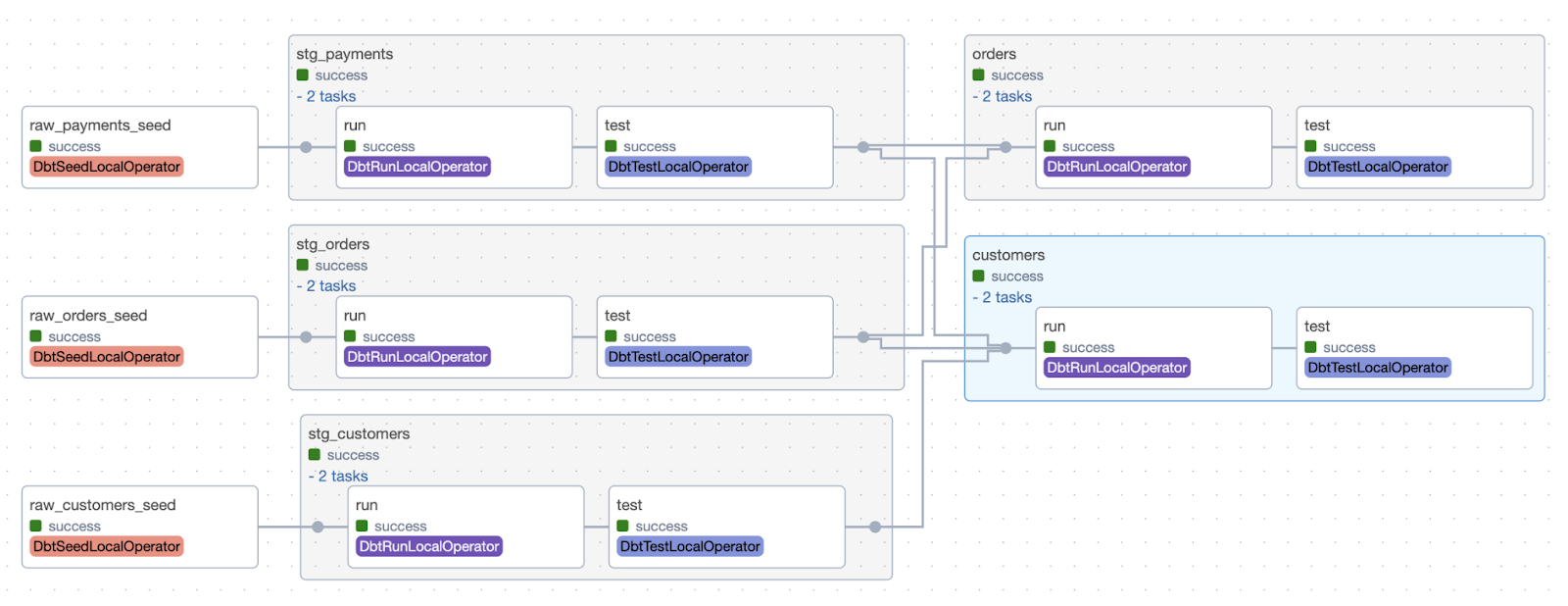
At GetYourGuide, Astronomer Cosmos has become a critical component of our stack, enabling us to manage dbt-to-dwh communication via Airflow connections, benefit from a UI-based approach for dbt models, and interact with post-run artifacts, sending alerts via Slack and tracking model metadata using tools like Montecarlo.
While adopting Cosmos, however, a few problems appeared that needed to be addressed as quickly as possible:
- Instead of enabling inter-DAG dependency with sensors, dbt sources are by default generated as empty operators in Airflow
- At GetYourGuide, we deal with delta tables, so VACUUM and OPTIMISE operations are often required. These should be run after the model is triggered, as dbt post-hooks end up delaying the DAG runtime
- When a query fails, locating it on databricks is a challenging task due to the overwhelming number of queries running together
- Having to deal with two separate repositories (Airflow and dbt) requires that both repos be in sync at all times
To address the above challenges, custom solutions were needed to ensure a robust setup. We’ll get into these later on in the blog post.
Dealing with sources
In data orchestration, it’s crucial that downstream processes only start when their upstream dependencies are satisfied. At GetYourGuide, Apache Airflow orchestrates dbt models, but a challenge emerged with how dbt sources are represented. Astronomer Cosmos, by default, translates dbt projects into Airflow DAGs, making dbt sources (external tables not managed by dbt) appear as EmptyOperator tasks. Although this provides a visual placeholder for lineage, it doesn’t automatically link to the Airflow tasks that load the source data. This can potentially lead to dbt models running on incomplete or outdated information.
Technical Implementation at GetYourGuide
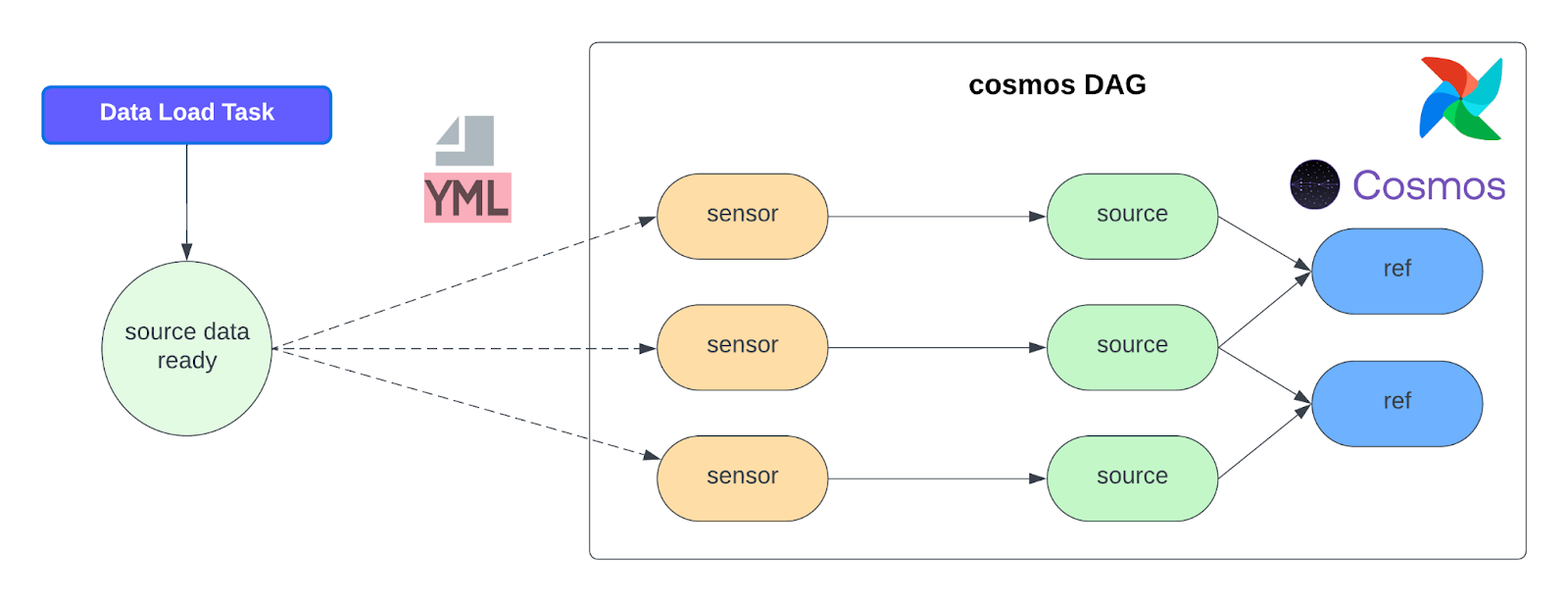
To overcome this challenge, we developed a strong solution using Airflow’s powerful sensor capabilities. Our aim was to establish explicit dependencies between the dbt source nodes and the Airflow tasks that generate the data. Instead of replacing the EmptyOperator with a sensor — an approach we first considered but found to burden the Airflow scheduler due to its operational complexity — we opted for a more straightforward and practical approach: adding the sensor as an upstream dependency of the existing EmptyOperator.
For each identified dbt source, we determine the specific Airflow DAG and task responsible for producing that source’s data using predefined mappings. When no predefined mapping is available, a central YAML file is explicitly used to create the sensor for the corresponding task. The structure of the YAML file is as follows:
{schema}_{table_name}:
external_dag_id: external dag to poke
external_task_id: external task to poke
meta: sensor-related params [optional]
Once the upstream producer’s external_dag_id and external_task_id are identified, an ExternalTaskSensor is automatically created and added as an upstream dependency to the EmptyOperator representing the dbt source.
This means the EmptyOperator will be marked as successful only when the sensor confirms that the upstream data is ready, effectively gating the dbt model’s execution.
Streamlining Delta table maintenance
At GetYourGuide, our data warehouse is built on Delta Lake, which provides useful features such as ACID transactions, time travel, and improved schema evolution. To maintain query performance and manage storage costs effectively, Delta tables require periodic maintenance operations, specifically VACUUM and OPTIMIZE.
Initially, we considered using dbt’s built-in post-hook feature to run these commands after a model builds. However, this approach presented a significant drawback: it would execute these maintenance operations within the same task that runs the dbt model. This would not only increase the runtime of the dbt job but also reduce visibility into the maintenance process. If an optimization command fails, the entire dbt model run fails, making debugging more complex. We needed a solution that was decoupled, observable, and efficient.
Technical implementation at GetYourGuide
To solve the previous issue, we decided to simply ran a dedicated Airflow task for dataset optimization that executes immediately after a dbt model is successfully built. We dynamically inject a PythonOperator after every dbt operator in our Cosmos DAGs, which executes VACUUM and/or OPTIMIZE commands. This new operator gets the table’s full path from the XCom produced by the Cosmos task, which is upstream to the Python operator.
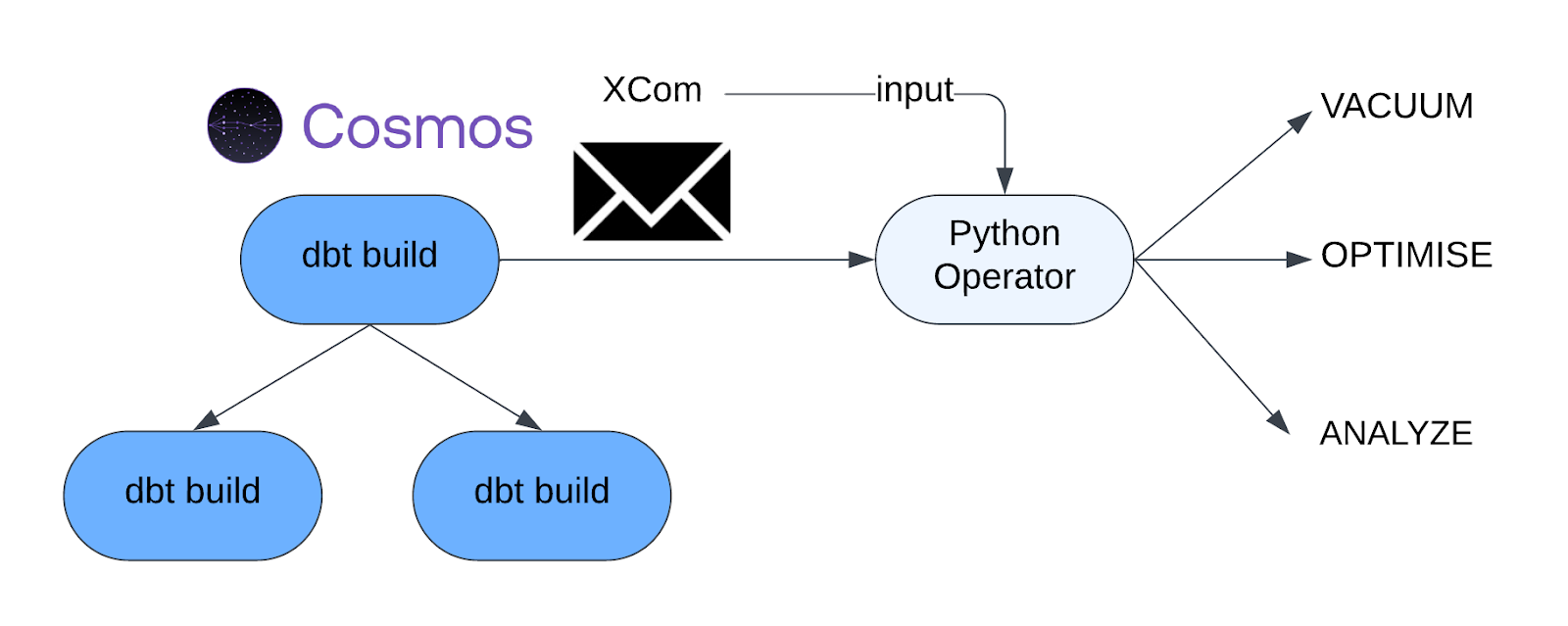
By separating the model-building logic from the table-maintenance logic, we gain better control and visibility. The maintenance task can be monitored, retried, and configured independently of the dbt transformation, resulting in a more resilient and manageable data platform.
Inter-DAG sensors: leveraging refs to preserve dbt lineage in Airflow
As we modularized our data warehouse by domain, we found that many dbt models in one domain (e.g., marketing) depend on models owned by another. Each team also runs its own Airflow DAGs with different schedules, retries, and metadata. Because of this, a single, monolithic DAG seemed hardly practical: some domains need to run multiple times per day, oversized DAGs are hard to manage, and a simple parsing error, like a typo, could bring the entire warehouse pipeline down.
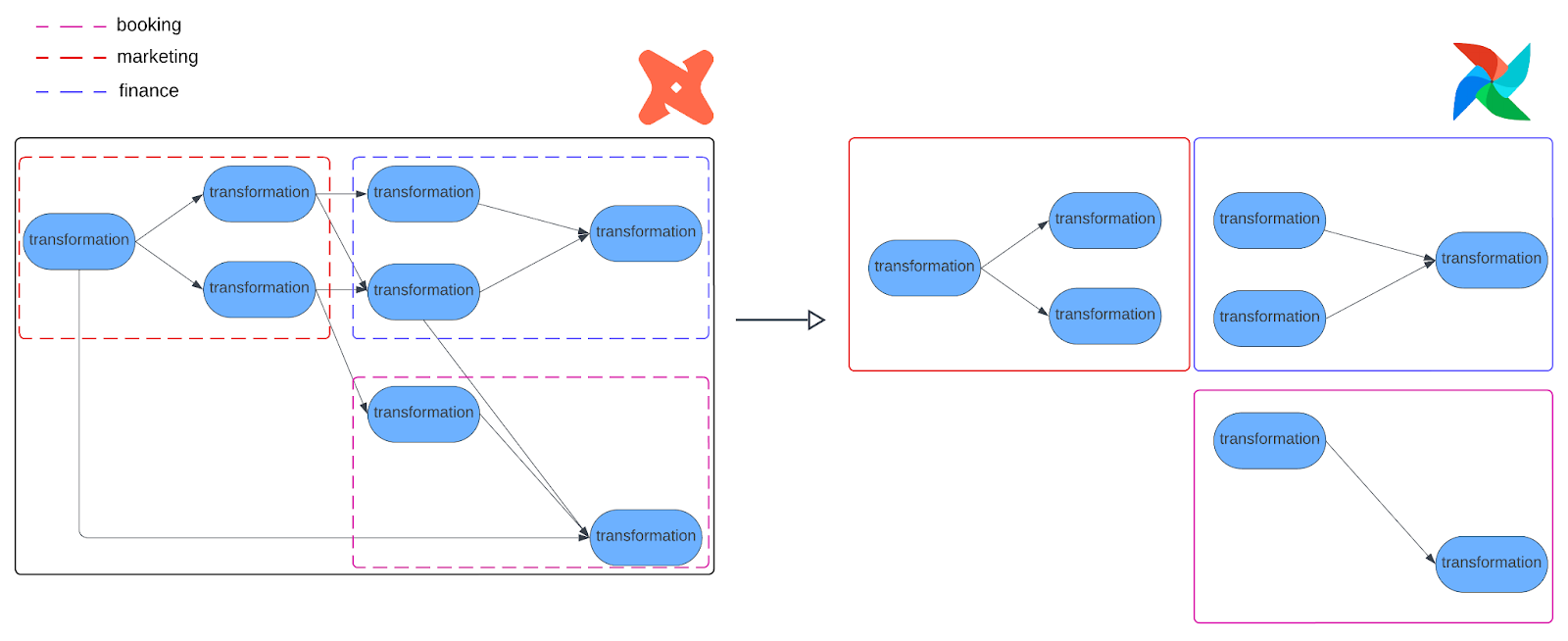
Cosmos lets us choose which models to run, but it doesn’t provide a built-in way for separate Cosmos-generated DAGs to coordinate with each other, as illustrated in the image above. We therefore needed Airflow DAGs to automatically respect cross-domain dependencies so that downstream tasks would never run before upstream models are refreshed. Evidently, this was a key requirement as we moved away from Rivulus while keeping the benefits of a modular Airflow-dbt setup.
Technical implementation at GetYourGuide
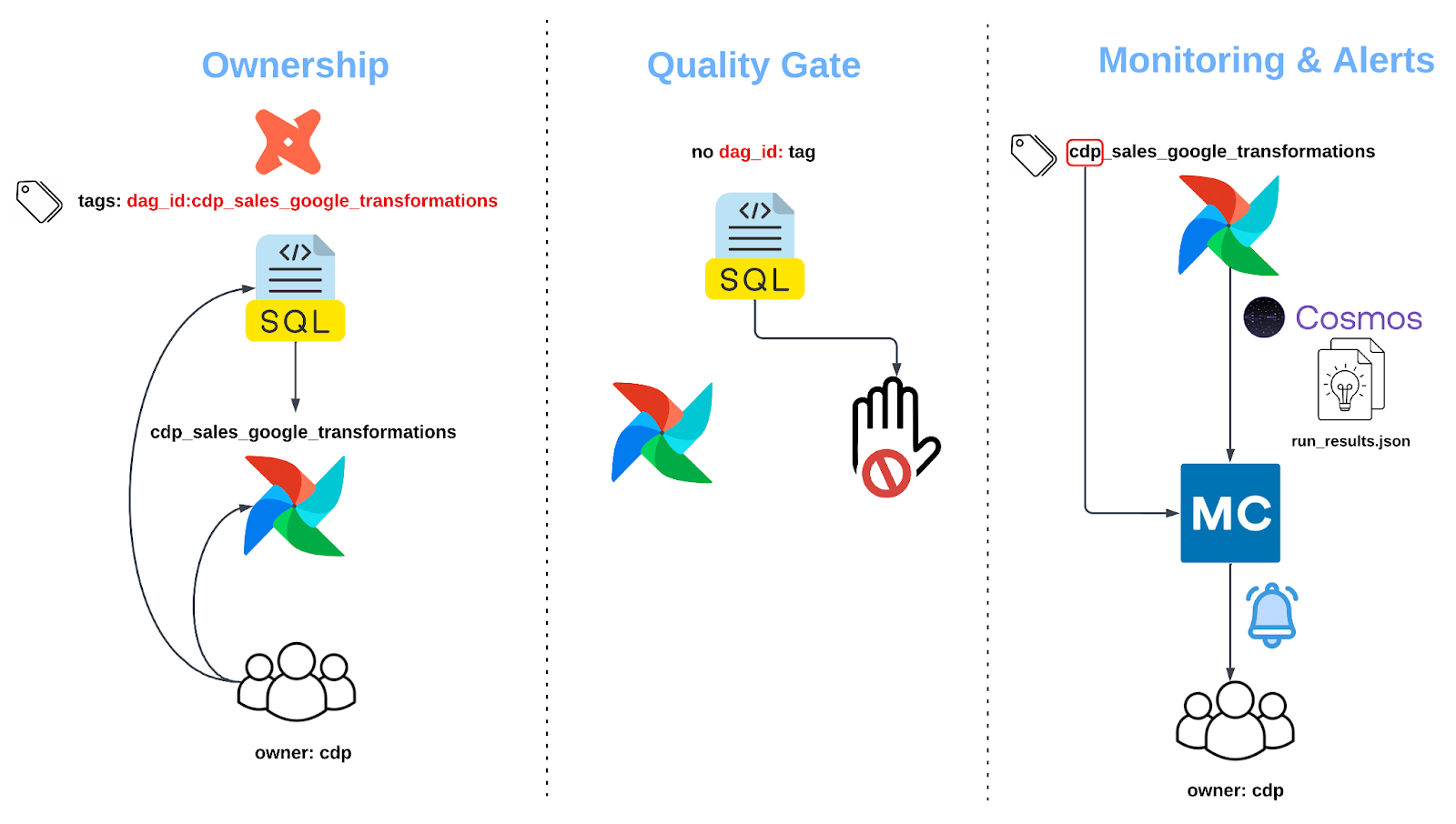
To address cross-domain dependencies, we engineered a flexible, tag-based architecture. This system allows our teams to work on their specific domains in a shared dbt repository while ensuring that the entire data lineage, even across team boundaries, is automatically understood and enforced in Airflow without any kind of intervention. First, let’s talk about the tag itself.
The Core Concept: A Simple Tag with Powerful Implications
The heart of our solution is a simple but powerful convention: we assign a specific tag to every dbt model in the following format:
dag_id: {airflow_dag_id}
This tag serves multiple purposes, the most important of which is that it directly indicates the DAG it belongs to.
We configured the Cosmos RenderConfig property to build each DAG by selecting only the models that carry its specific dag_id tag. This elegant mechanism partitions our single, monolithic dbt project into a collection of distinct, manageable Airflow DAGs by domain and team. The beauty of this approach is that we maintain the integrity of our unified dbt manifest while deploying it as a federation of independent, domain-owned workflows.
To make the tags meaningful and specific, we created a clear naming convention:
Dag_id:{team}_{domain}_{subdomain}_transformations
Having a rigid convention serves several essential purposes, such as providing unambiguous ownership, enabling quality control, and supporting monitoring and alerting in observability tools like Montecarlo.
Automated inter-DAG dependencies
The dbt manifest.json file is the single source of truth for refs, sources, and tags. From this file alone, we can find out the references of a model, as well as the tags in all models. Flattening and filtering the file for simplicity, it is later checked into the Airflow repo alongside other dbt artifacts, ensuring Airflow has all the information it needs, e.g., for enforcing lineage. Below is an example of this parsed manifest.
{
"finance_core_model": {
"refs": [
{
"name": "finance_stg_transactions",
"tags": ["layer:finance", "dag_id:team_finance_core_transformations", "owner:finance_analytics_team"]
}
],
"tags": ["layer:finance", "dag_id:team_finance_core_transformations", "owner:finance_analytics_team"]
}
}
When Airflow parses our DAGs, our custom DbtDagExtended class - extended from Cosmos DbtDag - springs into action. It loads the simplified parsed manifest and automatically weaves together the cross-DAG dependencies, following the order below:
- Focus on what matters: By iterating through all tasks of the DAG, we pay attention to DbtBuildLocalOperator, which refers to the actual dbt models that transform our data
- Cross-DAG examination: For each model dependency (ref), we extract the dag_id from its tags in our parsed manifest. If that dag_id differs from the current DAG id, we’ve found a cross-domain dependency that needs special handling,
- Sensor creation: if a cross-dependency is detected, a custom sensor based on the ExternalTaskSensor is created for the upstream dependency
- Deduplication: We remove redundant sensors
This algorithm transforms what could be a complex, error-prone manual process into an automatic, reliable system. Teams can focus on building their domain models while the infrastructure handles the web of dependencies seamlessly.
Known limitations and drawbacks
This section outlines some limitations and drawbacks of our current airflow-dbt implementation.
TaskGroup limitations
The algorithm described above for dbt references has some drawbacks. Our implementation extends Cosmos’ DbtDag and walks tasks to attach sensors and terminal nodes. It explicitly filters for DbtBuildLocalOperator instances at the DAG level. In Cosmos TaskGroup mode, operators are nested and not exposed the same way via dag.tasks; traversing and wiring sensors would require a different discovery strategy. As implemented, the inter-DAG sensor wiring is coupled to `DbtDag` rendering, not TaskGroups. This limitation prevents us from using Cosmos TaskGroups, which would be desirable for better organization and reduced DAG proliferation.
Sensor customization
Leveraging the manifest to identify dependencies is highly dynamic, enabling the creation of hundreds of sensors to ensure data freshness. This, however, also makes our setup more abstract and introduces additional customization, allowing users to use different sensors when the DAG requires it. For example, sensors generally use a single version of the ExternalTaskSensor with a single set of parameters, such as a timeout or retry. Any use case that requires a different setup requires a special implementation. These modifications and exceptions can quickly make the codebase more crowded and difficult to understand.
Special use case: PII
At GetYourGuide, we are naturally concerned about keeping sensitive data private and accessible only to those who need it. For this purpose, we have created a separate workspace and catalog in Databricks featuring stricter ACLs.
Given our Airflow-dbt integration described in this article, handling a new workspace with its own catalog, service principal, compute resource, etc., poses new challenges, especially since compiling and running models with dbt uses only one Databricks connection/profile to create the dbt artifacts. As soon as we run the models across different workspaces, the artifacts multiply and complicate the Airflow integration, which relies on a single set of artifacts.
In conclusion
By implementing a tag-based architecture to create hundreds of sensors and delegating specific tasks from dbt to Airflow, we transformed a significant orchestration challenge into a fully automated, reliable system. Our solution not only preserves dbt’s powerful lineage across dozens of independent Airflow DAGs but also enhances governance and streamlines local development. This framework empowers our teams to swiftly build, test, and deploy models for the business without worrying about the overhead of sensors and lineage, which are handled by our backend setup.

More articles like this
%202.JPG)
.JPG)